Perform Rate Override when Adding Additional Guests
Stay is enhanced to improve the handling of additional guest charges when reservations contain overridden room rates or modified package components. This enhancement ensures that when extra guests are added to a reservation, additional guest charges are applied consistently while allowing users to determine whether the existing overrides should be retained or recalculated.
Previously, when room rates or package components were manually modified in a reservation, adding an additional guest did not always apply the configured extra guest charges defined in the rate plan. With this update, the users are prompted to choose how the recalculation should be handled whenever overrides exist.
Overridden Rates when Updating Guest Count
To support this feature, two new tabs, Details and Overridden Rate have been added to the All Guests pop-up screen that appears when users modify the guest count of a booked reservation (Reservation ➜ Reservation Summary ➜ Guest).
The existing guest information details will be displayed in the Details tab. The Overridden Rates tab will be displayed when the following conditions are satisfied:
-
Room rates have been manually modified in the reservation (either through Stay or through integrations).
-
Included package components have been modified in the reservation.
-
Additional guests are added to the reservation and the Do not apply this charge option is not selected.
When these conditions are satisfied, the Next button will be enabled, allowing users to proceed to the Overridden Rates section.
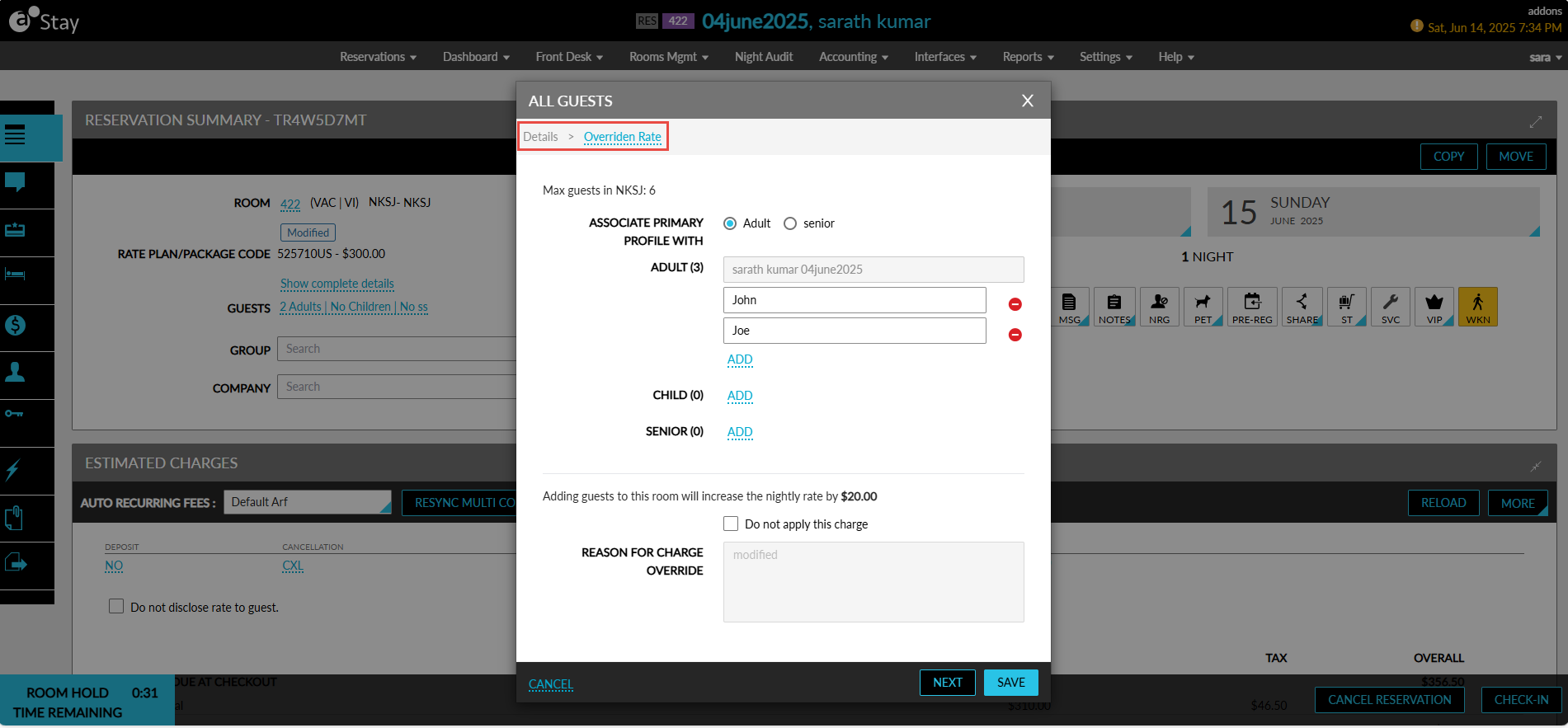
User Options for Rate Recalculation
When the reservation includes overridden room rates or modified package components, the following message will be displayed in the Overridden Rate section: The room rates/component in the reservation have been updated.
Users must select from the following options to proceed:
-
Keep Current Rate and Add Additional Guest Charge
-
Override Modifications and Reapply the Rates
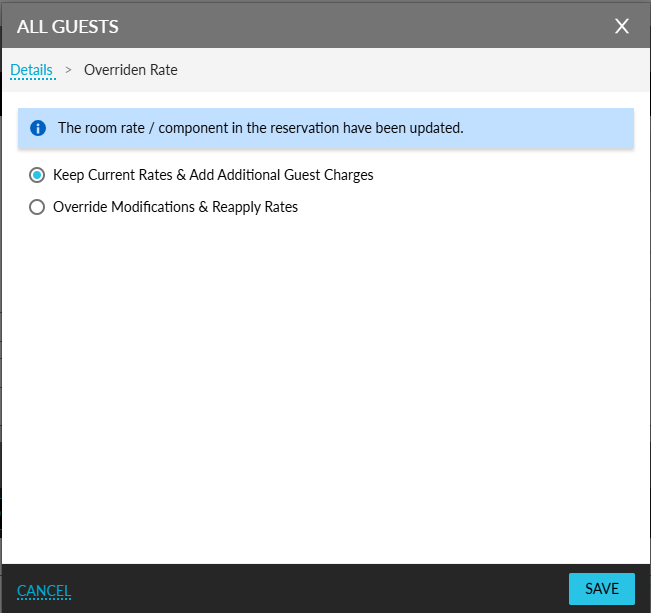
Keep Current Rate and Add Additional Guest Charge
Selecting this option retains the manually overridden room rate and component values already applied to the reservation. The additional guest charges are then applied on top of the modified values.
For example, if the original room rate was $500 and the user modified it to $450, and the extra adult charge is $50, the final rate will be calculated as $450 + $50.
This option ensures that user-applied overrides remain unchanged while still applying the configured extra guest charge.
Override Modifications and Reapply Rates
Selecting this option discards all manual overrides applied to the reservation. The room rate and included package components rates are recalculated based on the configured rate plan and the current daily rates. After recalculating the base rate, the additional guest charge is applied.
For example, if the original room rate is $500, and the extra adult charge is $50, the final rate will be recalculated as $500 + $50.
This option ensures that the reservation pricing fully aligns with the rate plan configuration and current daily rates.
Package and Group Reservations
For package reservations and group package reservations, both the room rate and the included components rates are evaluated.
When modifications are detected in either the room rate or the included components, a message indicating that both the room rate and included components have been modified in the reservation will be displayed.
When additional guests are added:
-
Per Person components increase based on the updated guest count.
-
Per Room components remain unchanged.
-
Per Reservation components remain unchanged.
-
Additional guest charges are distributed between the room rate and applicable included components based on the rate configuration.
The maximum adult limit configured for the reservation is also applied, ensuring that component values do not exceed the allowed threshold even when additional guests are added.
Additional Guest Charge Distribution
When an additional adult is added to a reservation:
-
Charges defined as Per Person components increase based on the number of guests.
-
The extra adult charge defined in the rate plan is applied.
-
If a portion of the additional charge corresponds to included components, that portion is applied to the relevant component, and the remaining amount is applied to the room rate.
-
The package rate is recalculated accordingly, reflecting the updated room rate and component values.
Dynamic Information Message Displayed
The informational message displayed in the Overridden Rates section dynamically changes based on the detected modifications:
-
When only room rates are modified, the message indicates that the room rate has been modified in the reservation.
-
When both room rates and included components are modified, the message indicates that both the room rate and included components have been modified in the reservation.
Enhancements to the Existing Functionality
Previously, when a reservation contained overridden room rates and an additional guest was added, the configured extra guest charge was not applied. The overridden rate remained unchanged without adding the additional guest charge.
Through this enhancement, the users are prompted to select whether they want to retain the overridden rate and add the extra guest charge or discard the overrides and recalculate the rates based on the rate plan configuration. This ensures accurate pricing and greater transparency when managing reservations with overridden rates.